Thursday, March 21, 2019

CodeSOD: Swing and You're Out

George G was hired to do some UI work for a company which sold a suite of networking hardware. As networking hardware needs to be highly configurable, George was hired on to do “some minor tweaks” to the UI. “It’s just some sizing issues, fonts, the like. I’m sure you’ll do something to the stylesheets or whatever,” said the boss.

The boss didn’t know what they were talking about. The UI for some of the products was a web based config tool. That was their consumer-grade products. Their professional grade products used the same Java program which was originally released 15 years earlier. There were no stylesheets. Instead, there was an ancient and wobbling pile of Java Swing UI code, maintained by a “master” who had Strong Opinions™ about how that code should look.

For example, dispatching a call to a method is indirection. Indirection is confusing. So inline those calls, especially if there's a conditional involved: inline all the “ifs”. Factory methods and other tools for constructing complex objects are confusing, so always inline your calls to constructors, and always pass as many parameters as you can, except for the times where you don’t do that, because why would we be consistent about anything?

All of the developers on the project had to attend to the master’s wishes during code reviews, where the master gleefully unrefactored code “to make it more clear.”

Also, keep in mind that this UI started back in an era where “800x600” was a viable screen resolution, and in fact, that’s the resolution it was designed against. On a modern monitor, it’s painfully tiny, stuffed with tabs and icons and other UI widgets. Over the years, the UI code has been tweaked to handle edge cases: one customer had the UI zoom turned on, so now there were piles of conditionals to check if the UI needed to be re-laid out. Somebody got a HiDPI display, so again, a bunch of checks and custom code paths, all piled together.

Speaking of layout, Swing was a prime case of Java taking object orientation to the extreme, so in addition to passing in widgets you want displayed, you also can supply a layout object which decides how to fill the frame. There was a whole library of them, but if you wanted a flexible layout that also handled screen scaling well, you had to use the most complicated one: Grid Bag. The Grid Bag, as the name implies, is a grid, but where the grid cells can be arbitrary sizes. You control this by adding constraints to the flow. It’s peak Java overcomplification, so even simple UIs tend to get convoluted, and with the “inline all the things” logic, you end up with code like this:

if( os.getSystemFontSize( NORMAL ) == 14 )
text = new JText("5", new GridBagConstraints(3, 1, 3,3, 1.0, 0.5, GridBagConstraints.PAGE_END, 1.5, Insets(10,5,10,5, 5, 5 ) );
else   
text = new JText("5", new GridBagConstraints(3, 1, 3,3, 0.99, 0.4, GridBagConstraints.PAGE_END, 1.5, Insets(4,2,4,5, 5, 5  ) );

This particular code checks to see if the user has their font set to 14pt. If they do, we’ll set a constraint one way. If it’s any other value, we’ll set the constraint a different way. What is the expected result of that constraint? Why all this just to display the number 5? There are a lot of numbers other than 14, and they’re all going to impact the layout of the screen.

George made it two months, and then quit. This happened just a week after another developer had quit. Another quit a week later. No one in the management chain could understand why they were losing developers so quickly, with only the master remaining behind.

[Advertisement] Utilize BuildMaster to release your software with confidence, at the pace your business demands. Download today!


To read the full article, please visit The Daily WTF

Wednesday, March 20, 2019

CodeSOD: Remove This

Denae inherited some 90s-era GUI code. The original developers have long since gone away, and the source control history has vanished into oblivion. In the 90s, the Standard Template Library for C++ was still very new, so when Denae needs to debug things in this application, it means doing some code archaeology and picking through home-brewed implementations of common data structures.

Denae’s most recent bug involved understanding why some UI elements weren’t updating properly. The basic logic the application used is that it maintained a List of GUI items which need to be repainted. So Denae dug into the the List implementation.

template <class Type> void List<Type>::Remove(Type t)
{
        int i;
        for (i=(num-1); i>=0; i--)
        {
                if(element[i] == t)
                {
                        break;
                }
        }
        LoudAssert(i>=0);
        DelIndex(i);
}

template <class Type> void List<Type>::DelIndex(int i)
{
        LoudAssert(i<num);
        num--;
        while(i<num)
        {
                element[i] = element[i+1];
                i++;
        }
}

Let’s start by talking about LoudAssert. Denae didn’t provide the implementation, but had this to say:

LoudAssert is an internally defined assert that is really just an fprintf to stderr. In our system stderr is silenced, always, so these asserts do nothing.

LoudAssert isn’t an assert, in any meaningful way. It’s a logging method which also doesn’t log in production. Which means there’s nothing that stops the Remove method from getting a negative index to remove- since it loops backwards- and passing it over to DelIndex. If you try and remove an item which isn’t in the list, that’s exactly what happens. And note how num, the number of items in the list, gets decremented anyway.

Denae noticed that this must be the source of the misbehaving UI updates when the debugger told her that the list of items contained -8 entries. She adds:

We have no idea how this ever worked, or what might be affected by fixing it, but it’s been running this way for over 20 years

[Advertisement] Utilize BuildMaster to release your software with confidence, at the pace your business demands. Download today!


To read the full article, please visit The Daily WTF

Tuesday, March 19, 2019

Exceptionally Serial

You may remember Kara, who recently found some "interesting" serialization code. Now, this code happens to be responsible for sending commands to pieces of machine equipment.

Low-level machine interfaces remain one of the domains where serial protocols rule. Serial communications use simple hardware and have minimal overhead, and something like RS232 has been in real-world use since the 60s. Sure, it's slow, sure it's not great with coping with noise, sure you have to jump through some hoops if you want a connection longer than 15m, but its failures are well understood.

Nothing is so well understood that some developer can't make a mess of it.

Public Function SendCommand(ByVal cmd As String) As String Dim status As Integer ' Write cmd to the serial port using a protocol that is too painful to reproduce here. ' status receives an appropriate value along the way as the protocol checks for various error ' conditions including timeout If status <> 0 Then Throw MakeComPortException(status) End Function Private Function MakeComPortException(ByVal status As Integer) As ComPortException Dim code As Integer Dim message As String = Nothing GetErrorCode(status, code, message) Return New ComPortException(code, message) End Function Private Sub GetErrorCode(ByVal ErrorNum As Integer, ByRef code As Integer, ByRef message As String) code = ErrorNum Select Case ErrorNum Case 129 : message = "Hardware error occured during Send Data" ' Talk Error' Case 130 : message = "System asked to talk but did not recieve Previous Talk Command" ' Nothing to say Case 131 : SendCommand("ERRMS?") Dim EMsg As String = GetResponse() Dim EmsgStart As Integer = EMsg.IndexOf(" (") Try If EMsg.Contains("ERR=") Then code = CInt(EMsg.Substring(4, EmsgStart - 4)) Catch ex As Exception End Try message = EMsg.Substring(EmsgStart) Case 132 : message = "H/W Error while system trying to accept data" 'Listen Error Case 133 : message = "More than 80 characters received before term char" Case 134 : message = "Archive media is full" Case 135 : message = "Listen state interrupted by ESC key" ' Interrupted from keyboard Case 136 : message = "Listen state interrupted by controller sending '*'" ' Interrupted by Controller Case 137 : message = "Error Occured in UART" Case StatusCodes.PortDeviceNotFoundErrorCode : message = "No device Found" Case StatusCodes.PortTimeoutErrorCode : message = "COM port Timeout Error" ' This next occurs if cable is unplugged at controller Case StatusCodes.PortDisconnectedErrorCode : message = "Serial cable disconnected" Case Else : message = "Error #: " & ErrorNum End Select End Sub
 

So, the SendCommand method takes a string and passes it down the serial port. The protocol details were elided here, but we know that we receive a status number. MakeComPortException takes that number and helpfully looks up the message which goes with it, using GetErrorCode.

GetErrorCode is one gigantic switch statement. And let's pay close attention to the message lookup process for error 131. You'll note that we call SendCommand to ask the remote device to tell us what the error message was. But in some cases, it's going to reply to that request with an error code. Error 131, to be exact.

So if we trace this: we call SendCommand which gets a 131 error, which forces it to throw the results of calling MakeComPortException, which calls GetErrorCode, which calls SendCommand, which throws a new MakeComPortException, which…

There's an interesting side effect of this approach. Despite looking like a series of recursive calls, throw unwinds the stack, so this code will never actually trigger a stack overflow. It's actually more of an exception-assisted infinite loop.

For a bonus, note the PortTimeoutErrorCode entry. On the hardware side, they use a custom serial cable which wires a loopback on the RS232 "Ready to Send" and "Clear to Send" pins, which the software uses to detect that the cable is unplugged. It also has the side effect of ensuring that no off-the-shelf RS232 cables will work with the software. This is either a stupid mistake, or a fiendishly clever way to sell heavily marked-up replacement cables.

[Advertisement] BuildMaster allows you to create a self-service release management platform that allows different teams to manage their applications. Explore how!


To read the full article, please visit The Daily WTF

Monday, March 18, 2019

Portage and Portability

ST 225 20MB drive and WDC controller

Many moons ago, when PCs came housed within heavy cases of metal and plastic, Matt Q. and his colleague were assigned to evaluate a software package for an upcoming sales venture. Unfortunately, he and the colleague worked in different offices within the same metro area. As this was an age bereft of effective online collaboration tools, Matt had to travel regularly to the other office, carrying his PC with him. Each time, that meant unscrewing and unhooking the customary 473 peripheral cables from the back of the box, schlepping it through the halls and down the stairs, and catching the bus to reach the other office, where he got to do all those things again in reverse order. When poor scheduling forced the pair to work on the weekend, they hauled their work boxes between apartments as well.

As their work proceeded, Matt reached the limits of what his 20 MB hard drive could offer. From his home office, Matt filed a support ticket with IT. The technician assigned to his ticket—Gary—arrived at Matt's cubicle some time later, brandishing a new hard drive and a screwdriver. Gary shooed Matt away for more coffee to better focus on his patient. One minor surgery later, Matt's PC was back up and running with a bigger hard drive.

One day ahead of the project deadline, Matt was nearly done with his share of the work. He just had a few tweaks to make to his reports before copying them to the floppy disks needed by the sales team. Having hooked his PC back up within his cubicle, he switched it on—only to be greeted with a literal bang. The PC was dead and would not start.

After a panicked call to IT, Gary eventually reappeared at his desk with a screwdriver. Upon cracking open the PC case, he immediately cried, "Wait a minute! Have you been carting this PC around?"

Matt frowned. "Er, yes. Is that a problem?"

"I'll say! You weren't supposed to do that!" Gary scolded. "The hard drive's come loose and shorted out the workings!"

Matt darted over to Gary's side so he could see the computer's innards for himself. It didn't take long at all to notice that the new hard drive had been "secured" into place using Scotch tape.

"Hang on! I daresay you weren't supposed to do that!" Matt pointed to the offending tape. "Shall I check with your manager to be on the safe side?"

Gary's face crumpled. "I don't have access to the proper mountings!"

"Then find someone who does!"

Armed with his looming deadline and boss' approval, Matt escalated his support ticket even higher. It didn't take long at all for genuine mounting brackets to replace the tape. He never learned why IT techs were being deprived of necessary hardware; he assumed it was some fool's idea of a brilliant cost-cutting measure. He had to wonder how many desperate improvisations held their IT infrastructure together, and how much longer they would've gone unnoticed if it hadn't been for his PC-toting ways.

[Advertisement] Forget logs. Next time you're struggling to replicate error, crash and performance issues in your apps - Think Raygun! Installs in minutes. Learn more.


To read the full article, please visit The Daily WTF

Friday, March 15, 2019

Error'd: Do Not Read The Daily WTF

Neil S. wrote, "MSN UK's reverse psychology marketing angle is pretty edgy."


"Batman & Lorem was a surprise flop at the box office," writes Art O.


Klaus asks, "Do I want to know, why Feedly associates Coffee with restrooms?"


"Those idiots, I clearly asked for null_-532419553!" wrote Raymond D.


Nigel writes, "I just hope their drugs aren't as genuine as their Windows licenses."


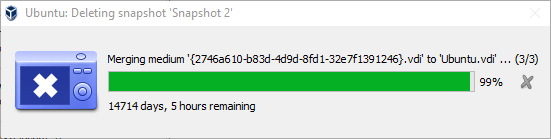
"At this point, I don't even remember how long I'd been waiting to get to this point," writes Jake B.


[Advertisement] Otter - Provision your servers automatically without ever needing to log-in to a command prompt. Get started today!


To read the full article, please visit The Daily WTF