Monday, April 30, 2018

CodeSOD: Philegex

Last week, I was doing some graphics programming without a graphics card. It was low resolution, so I went ahead and re-implemented a few key methods from the Open GL Shader Language in a fashion which was compatible with NumPy arrays. Lucky for me, I was able to draw off many years of experience, I understood both technologies, and they both have excellent documentation which made it easy. After dozens of lines of code, I was able to whip up some pretty flexible image generator functions. I knew the tools I needed, I understood how they worked, and while I was reinventing a wheel, I had a very specific reason.

Philemon Eichin sends us some code from a point in his career where none of these things were true.

Philemon was building a changelog editor. As such, he wanted an easy, flexible way to identify patterns in the text. Philemon knew that there was something that could do that job, but he didn’t know what it was called or how it was supposed to work. So, like all good programmers, Philemon went ahead and coded up what he needed- he invented his own regular expression language, and built his own parser for it.

Thus was born Philegex. Philemon knew that regexes involved slashes, so in his language you needed to put a slash in front of every character you wanted to match exactly. He knew that it involved question marks, so he used the question mark as a wildcard which could match any character. That left the ’|" character to be optional.

So, for example: /P/H/I/L/E/G/E/X|??? would match “PHILEGEX!!!” or “PHILEGEWTF”. A date could be described as: nnnn/.nn/.nn. (YYYY.MM.DD or YYYY.DD.MM)

Living on his own isolated island without access to the Internet to attempt to google up “How to match patterns in text”, Philemon invented his own language for describing parts of a regular expression. This will be useful to interpret the code below.

Philegex Regex
Maskable Matches
p1 Pattern / Regex
Block(s) Token(s)
CT CharType
SplitLine ParseRegex
CC currentChar
auf_zu openParenthesis
Chars CharClassification

With the preamble out of the way, enjoy Philemon’s approach to regular expressions, implemented elegantly in VB.Net.

Public Class Textmarker
    Const Datum As String = "nn/.nn/.nnnn"

    Private Structure Blocks
        Dim Type As Chars
        Dim Multi As Boolean
        Dim Mode As Char_Mode
        Dim Subblocks() As Blocks
        Dim passed As Boolean
        Dim _Optional As Boolean
    End Structure


    Public Shared Function IsMaskable(p1 As String, Content As String) As Boolean
        Dim ID As Integer = 0
        Dim p2 As Chars
        Dim _Blocks() As Blocks = SplitLine(p1)
        For i As Integer = 0 To Content.Length - 1
            p2 = GetCT(Content(i))
START_CASE:
            '#If CONFIG = "Debug" Then
            '            If ID = 2 Then
            '                Stop
            '            End If

            '#End If
            If ID > _Blocks.Length - 1 Then
                Return False
            End If
            Select Case _Blocks(ID).Mode
                Case Char_Mode._Char
                    If p2.Char_V = _Blocks(ID).Type.Char_V Then
                        _Blocks(ID).passed = True
                        If Not _Blocks(ID).Multi = True Then ID += 1
                        Exit Select
                    Else
                        If _Blocks(ID).passed = True And _Blocks(ID).Multi = True Then
                            ID += 1
                            GoTo START_CASE
                        Else
                            If Not _Blocks(ID)._Optional Then Return False

                        End If
                    End If
                Case Char_Mode.Type
                    If _Blocks(ID).Type.Type = Chartypes.any Then
                        _Blocks(ID).passed = True
                        If Not _Blocks(ID).Multi = True Then ID += 1
                        Exit Select
                    Else


                        If p2.Type = _Blocks(ID).Type.Type Then
                            _Blocks(ID).passed = True
                            If Not _Blocks(ID).Multi = True Then ID += 1
                            Exit Select
                        Else
                            If _Blocks(ID).passed = True And _Blocks(ID).Multi = True Then
                                ID += 1
                                GoTo START_CASE
                            Else
                                If _Blocks(ID)._Optional Then
                                    ID += 1
                                    _Blocks(ID - 1).passed = True
                                Else
                                    Return False

                                End If

                            End If
                        End If

                    End If


            End Select


        Next
        For i = ID To _Blocks.Length - 1
            If _Blocks(ID)._Optional = True Then
                _Blocks(ID).passed = True
            Else
                Exit For
            End If
        Next
        If _Blocks(_Blocks.Length - 1).passed Then
            Return True
        Else
            Return False
        End If

    End Function

    Private Shared Function GetCT(Char_ As String) As Chars

        If "0123456789".Contains(Char_) Then Return New Chars(Char_, 2)
        If "qwertzuiopüasdfghjklöäyxcvbnmß".Contains((Char.ToLower(Char_))) Then Return New Chars(Char_, 1)
        Return New Chars(Char_, 4)
    End Function


    Private Shared Function SplitLine(ByVal Line As String) As Blocks()
        Dim ret(0) As Blocks
        Dim retID As Integer = -1
        Dim CC As Char
        For i = 0 To Line.Length - 1
            CC = Line(i)
            Select Case CC
                Case "("
                    ReDim Preserve ret(retID + 1)
                    retID += 1
                    Dim ii As Integer = i + 1
                    Dim auf_zu As Integer = 1
                    Do
                        Select Case Line(ii)
                            Case "("
                                auf_zu += 1
                            Case ")"
                                auf_zu -= 1
                            Case "/"
                                ii += 1
                        End Select
                        ii += 1
                    Loop Until auf_zu = 0
                    ret(retID).Subblocks = SplitLine(Line.Substring(i + 1, ii - 1))
                    ret(retID).Mode = Char_Mode.subitems
                    ret(retID).passed = False

                Case "*"
                    ret(retID).Multi = True
                    ret(retID).passed = False
                Case "|"
                    ret(retID)._Optional = True

                Case "/"
                    ReDim Preserve ret(retID + 1)
                    retID += 1
                    ret(retID).Mode = Char_Mode._Char
                    ret(retID).Type = New Chars(Line(i + 1), Chartypes.other)
                    i += 1
                    ret(retID).passed = False

                Case Else

                    ReDim Preserve ret(retID + 1)
                    retID += 1
                    ret(retID).Mode = Char_Mode.Type
                    ret(retID).Type = New Chars(Line(i), TocType(CC))
                    ret(retID).passed = False
            End Select
        Next
        Return ret
    End Function
    Private Shared Function TocType(p1 As Char) As Chartypes
        Select Case p1
            Case "c"
                Return Chartypes._Char
            Case "n"
                Return Chartypes.Number
            Case "?"
                Return Chartypes.any
            Case Else
                Return Chartypes.other
        End Select
    End Function

    Public Enum Char_Mode As Integer
        Type = 1
        _Char = 2
        subitems = 3
    End Enum
    Public Enum Chartypes As Integer
        _Char = 1
        Number = 2
        other = 4
        any
    End Enum
    Structure Chars
        Dim Char_V As Char
        Dim Type As Chartypes
        Sub New(Char_ As Char, typ As Chartypes)
            Char_V = Char_
            Type = typ
        End Sub
    End Structure
End Class

I’ll say this: building a finite state machine, which is what the core of a regex engine is, is perhaps the only case where using a GoTo could be considered acceptable. So this code has that going for it. Philemon was kind enough to share this code with us, so we knew he knows it’s bad.

[Advertisement] ProGet can centralize your organization's software applications and components to provide uniform access to developers and servers. Check it out!


To read the full article, please visit The Daily WTF

Friday, April 27, 2018

Error'd: Billboards Show Obvious Disasters

"Actually, this board is outside a casino in Sheffield which is next to the church, but we won't go there," writes Simon.


Wouter wrote, "The local gas station is now running ads for Windows 10 updates."


"If I were to legally change my name to a GUID, this is exactly what I'd pick," Lincoln K. wrote.


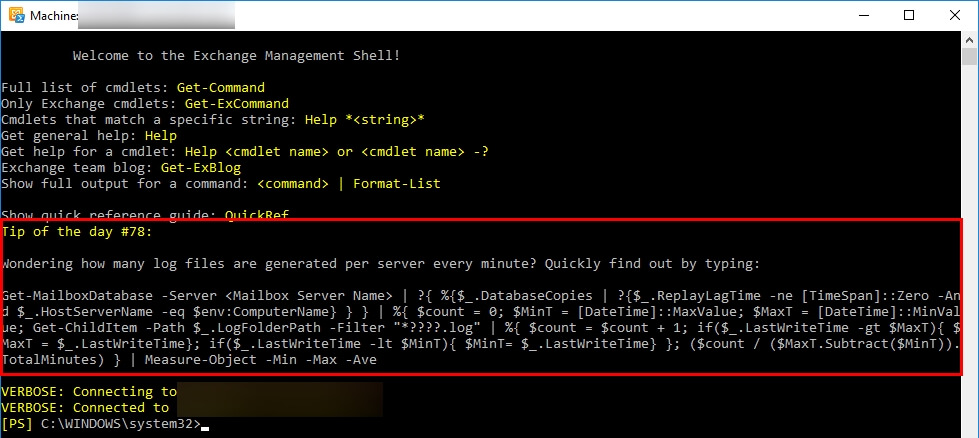
Robert F. writes, "Copy/Paste? Bah! If you really want to know how many log files are being generated per server, every minute, you're going to have to earn it by typing out this 'easy' command."


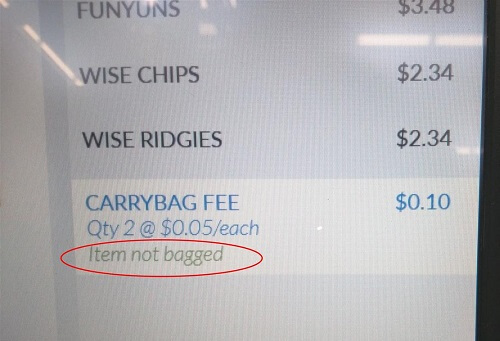
"I imagine someone pushed the '10 items or fewer' rule on the self-checkout kiosk just a little too far," Michael writes.


Wojciech wrote, "To think - someone actually doodled this JavaScript code!"


[Advertisement] Forget logs. Next time you're struggling to replicate error, crash and performance issues in your apps - Think Raygun! Installs in minutes. Learn more.


To read the full article, please visit The Daily WTF

Thursday, April 26, 2018

CodeSOD: If Not Null…

Robert needed to fetch some details about pump configurations from the backend. The API was poorlry documented, but there were other places in the code which did that, so a quick search found this block:

var getConfiguration = function(){
    ....
    var result = null;
    result = getPumpConfiguration (areaID,subStationID,mngmtUnitID,lastServiceDate,service,format,result);
    result = getPumpConfiguration (areaID,subStationID,null,lastServiceDate,null,format,result);
    result = getPumpConfiguration (areaID,subStationID,null,lastServiceDate,service,null,result);
    result = getPumpConfiguration (areaID,subStationID,mngmtUnitID,lastServiceDate,null,null,result);
    result = getPumpConfiguration (areaID,subStationID,null,lastServiceDate,null,null,result);
    return result;
}

This collection of lines lurked at the end of a 100+ line function, which did a dozen other things. At a glance, it’s mildly perplexing. I can see that result gets passed into the function multiple times, so perhaps this is an attempt at a fluent API? So this series of calls awkwardly fetches the data that’s required? The paraameters vary a little with every call, so that must be it, right?

Let’s check the implementation of getPumpConfiguration

function getPumpConfiguration (areaID,subStationID,mngmtUnitID,lastServiceDate,service,format,result) {
    if (result==null) {
    ...
    result = queryResult;
    ...
    }
    return result;
}

Oh, no. If the result paraameter has a value… we just return it. Otherwise, we attempt to fetch data. This isn’t a fluent API which loads multiple pieces of data with separate requests, it’s an attempt at implementing retries. Hopefully one of those calls works.

[Advertisement] Continuously monitor your servers for configuration changes, and report when there's configuration drift. Get started with Otter today!


To read the full article, please visit The Daily WTF

Wednesday, April 25, 2018

The Search for Truth

Every time you change existing code, you break some other part of the system. You may not realize it, but you do. It may show up in the form of a broken unit test, but that presumes that a) said unit test exists, and b) it properly tests the aspect of the code you are changing. Sadly, more often than not, there is either no test to cover your change, or any test that does exist doesn't handle the case you are changing.

Nicolai Abildgaard - Diogenes der lyser i mørket med en lygte.jpg

This is especially true if the thing you are changing is simple. It is even more true when changing something as complex as working with a boolean.

Mr A. was working at a large logistics firm that had an unusual error where a large online retailer was accidentally overcharged by millions of dollars. When large companies send packages to logistics hubs for shipment, they often send hundreds or thousands of them at a time on the same pallet, van or container (think about companies like Amazon). The more packages you send in these batches the less you pay (a single lorry is cheaper than a fleet of vans). These packages are lumped together and billed at a much lower rate than you or I would get.

One day, a particular developer saw something untidy in the code - an uninitialized Boolean variable in one of the APIs. The entire code change was from this:

    parcel.consolidated;

to this:

    parcel.consolidated = false;

There are some important things to note: the code was written in NodeJS and didn't really have the concept of Boolean, the developers did not believe in Unit Testing, and in a forgotten corner of the codebase was a little routine that examined each parcel to see if the discount applied.

The routine to see if the discount should be applied ran every few minutes. It looked at each package and if it was marked as consolidated or not, then it moved on to the next parcel. If the flag was NULL, then it applied the rules to see if was part of a shipment and set the flag to either True or False.

That variable was not Boolean but rather tri-state (though thankfully didn't involve FILE_NOT_FOUND). By assuming it was Boolean and initializing it, NO packages had a discount applied. Oopsie!

It took more than a month before anyone noticed and complained. And since it was a multi-million dollar mistake, they complained loudly!

Even after this event, Unit Testing was still not accepted as a useful practice. To this day Release Management, Unit Testing, Automated Testing and Source Code Management remain stubbornly absent...

Not long after this, Mr. A. continued his search for truth elsewhere.

[Advertisement] Continuously monitor your servers for configuration changes, and report when there's configuration drift. Get started with Otter today!


To read the full article, please visit The Daily WTF

Tuesday, April 24, 2018

The Big Balls of…

The dependency graph of your application can provide a lot of insight into how objects call each other. In a well designed application, this is probably mostly acyclic and no one node on the graph has more than a handful of edges coming off of it. The kinds of applications we talk about *here, on the other hand, we have a name for their graphs: the Enterprise Dependency and the Big Ball of Yarn.

Thomas K introduces us to an entirely new iteration: The Big Ball of Mandelbrot

A dependency graph which exhibits self-similarity at different scales

This gives new meaning to points “on a complex plane”.

What you’re seeing here is the relationship between stored procedures and tables. Circa 1995, when this application shambled into something resembling life, the thinking was, “If we put all the business logic in stored procedures, it’ll be easy to slap new GUIs on there as technology changes!”

Of course, the relationship between what the user sees on the screen and the underlying logic which drives that display means that as they changed the GUI, they also needed to change the database. Over the course of 15 years, the single cohesive data model ubercomplexificaticfied itself as each customer needed a unique GUI with a unique feature set which mandated unique tables and stored procedures.

By the time Thomas came along to start a pseudo-greenfield GUI in ASP.Net, the first and simplest feature he needed to implement involved calling a 3,000 line stored procedure which required over 100 parameters.

[Advertisement] Otter - Provision your servers automatically without ever needing to log-in to a command prompt. Get started today!


To read the full article, please visit The Daily WTF

Monday, April 23, 2018

Kitten Plays, Dog Sleeps: A Lovestory

Cats and dogs do have very similar skillsets. They excel at sleeping, eating and playing. But when a cat and a dog are exercising a different skill, unexpected romance can occur.

The post Kitten Plays, Dog Sleeps: A Lovestory appeared first on Viral Viral Videos.


To read the full article, please visit Viral Viral Videos

Representative Line: The Truth About Comparisons

We often point to dates as one of the example data types which is so complicated that most developers can’t understand them. This is unfair, as pretty much every data type has weird quirks and edge cases which make for unexpected behaviors. Floating point rounding, integer overflows and underflows, various types of string representation…

But file-not-founds excepted, people have to understand Booleans, right?

Of course not. We’ve all seen code like:

if (booleanFunction() == true) …

Or:

if (booleanValue == true) {
    return true;
} else {
    return false;
}

Someone doesn’t understand what booleans are for, or perhaps what the return statement is for. But Paul T sends us a representative line which constitutes a new twist on an old chestnut.

if ( Boolean.TRUE.equals(functionReturningBooleat(pa, isUpdateNetRevenue)) ) …

This is the second most Peak Java Way to test if a value is true. The Peak Java version, of course, would be to use an AbstractComparatorFactoryFactory<Boolean> to construct a Comparator instance with an injected EqualityComparison object. But this is pretty close- take the Boolean.TRUE constant, use the inherited equals method on all objects, which means transparently boxing the boolean returned from the function into an object type, and then executing the comparison.

THe if (boolean == true) return true; pattern is my personal nails-on-the-chalkboard code block. It’s not awful, it just makes me cringe. Paul’s submission is like an angle-grinder on a chalkboard.

[Advertisement] Continuously monitor your servers for configuration changes, and report when there's configuration drift. Get started with Otter today!


To read the full article, please visit The Daily WTF

Sunday, April 22, 2018

How WhatsApp Was Being Used In The ’80s

Did you know WhatsApp has been around for decades? Ever wonder what it looked like back in the day? Well no more, have a sneak peek at a long forgotten era.

The post How WhatsApp Was Being Used In The ’80s appeared first on Viral Viral Videos.


To read the full article, please visit Viral Viral Videos

Best News Bloopers Of March 2018

News anchors try so hard to make the news less serious. To make it engaging and emotional. Sometimes they succeed, and when they don’t they pull the blooper card, so they at least deserve a […]

The post Best News Bloopers Of March 2018 appeared first on Viral Viral Videos.


To read the full article, please visit Viral Viral Videos

Saturday, April 21, 2018

Most Extreme Fails Of The Week

It’s the same song over and over again, and we just can’t get enough. People do stupid things or get involved with dumb friend, and this is the result. A weekly compilation of the best […]

The post Most Extreme Fails Of The Week appeared first on Viral Viral Videos.


To read the full article, please visit Viral Viral Videos

What Birds Do Metal Singers Sound Like?

Metal is probably under-appreciated as a music category, especially when you consider metal singers all have a secret talent. They each sound like a bird. That’s right, you heard it here first (well not really, […]

The post What Birds Do Metal Singers Sound Like? appeared first on Viral Viral Videos.


To read the full article, please visit Viral Viral Videos

Friday, April 20, 2018

The Goodest Pets Of The Week

Some pets are naughty and some are good. Loyal and cuddly. But the most loyal and cuddliest of them all make it to this best pets of the week compilation. It doesn’t get better than […]

The post The Goodest Pets Of The Week appeared first on Viral Viral Videos.


To read the full article, please visit Viral Viral Videos

Error'd: Placeholders-a-Plenty

"On my admittedly old and cheap phone, Google Maps seems to have confused the definition of the word 'trip'," writes Ivan.


"When you're Gas Networks Ireland, and don't have anything nice to say, I guess you just say lorem ipsum," wrote Gabe.


Daniel D. writes, "Google may not know how I got 100 GB, but they seem pretty sure that it's expiring soon."


Peter S. wrote, "F1 finally did it. The quantum driver Lastname is driving a Ferrari and chasing him- or herself in Red Bull."


Hrish B. writes, "I hope my last name is not an example as well."


Peter S. wrote, "Not sure what IEEE wants me to vote for. But I would vote for hiring better coders."


"Well, at least they got my name right, half of the time," Peter S. writes.


[Advertisement] Forget logs. Next time you're struggling to replicate error, crash and performance issues in your apps - Think Raygun! Installs in minutes. Learn more.


To read the full article, please visit The Daily WTF

Thursday, April 19, 2018

Baby Elephant Loves The Rain

Elephants are used to pretty weather, nice and sunny. So you can imagine what happens when rain comes pouring down. That doesn’t happen too often, so this baby elephant enjoys it to the fullest.

The post Baby Elephant Loves The Rain appeared first on Viral Viral Videos.


To read the full article, please visit Viral Viral Videos

CodeSOD: A Problematic Place

In programming, sometimes the ordering of your data matters. And sometimes the ordering doesn’t matter and it can be completely random. And sometimes… well, El Dorko found a case where it apparently matters that it doesn’t matter:

DirectoryInfo di = new DirectoryInfo(directory);
FileInfo[] files = di.GetFiles();
DirectoryInfo[] subdirs = di.GetDirectories();

// shuffle subdirs to avoid problematic places
Random rnd = new Random();
for( int i = subdirs.Length - 1; i > 0; i-- )
{
    int n = rnd.Next( i + 1 );
    DirectoryInfo tmp = subdirs[i];
    subdirs[i] = subdirs[n];
    subdirs[n] = tmp;
}

foreach (DirectoryInfo dir in subdirs)
{
   // process files in directory
}

This code does some processing on a list of directories. Apparently while coding this, the author found themself in a “problematic place”. We all have our ways of avoiding problematic places, but this programmer decided the best way was to introduce some randomness into the equation. By randomizing the order of the list, they seem to have completely mitigated… well, it’s not entirely clear what they’ve mitigated. And while their choice of shuffling algorithm is commendable, maybe next time they could leave us a comment elaborating on the problematic place they found themself in.

[Advertisement] ProGet can centralize your organization's software applications and components to provide uniform access to developers and servers. Check it out!


To read the full article, please visit The Daily WTF

Wednesday, April 18, 2018

The Proprietary Format

Have you ever secured something with a lock? The intent is that at some point in the future, you'll use the requisite key to regain access to it. Of course, the underlying assumption is that you actually have the key. How do you open a lock once you've lost the key? That's when you need to get creative. Lock picks. Bolt cutters. Blow torch. GAU-8...

In 2004, Ben S. went on a solo bicycle tour, and for reasons of weight, his only computer was a Handspring Visor Deluxe PDA running Palm OS. He had an external, folding keyboard that he would use to type his notes from each day of the trip. To keep these notes organized by day, he stored them in the Datebook (calendar) app as all-day events. The PDA would sync with a desktop computer using a Handspring-branded fork of the Palm Desktop software. The whole Datebook could then be exported as a text file from there. As such, Ben figured his notes were safe. After the trip ended, he bought a Windows PC that he had until 2010, but he never quite got around to exporting the text file. After he switched to using a Mac, he copied the files to the Mac and gave away the PC.

Handspring Treo 90

Ten years later, he decided to go through all of the old notes, but he couldn't open the files!

Uh oh.

The Handspring company had gone out of business, and the software wouldn't run on the Mac. His parents had the Palm-branded version of the software on one of their older Macs, but Handspring used a different data file format that the Palm software couldn't open. His in-laws had an old Windows PC, and he was able to install the Handspring software, but it wouldn't even open without a physical device to sync with, so the file just couldn't be opened. Ben reluctantly gave up on ever accessing the notes again.

Have you ever looked at something and then turned your head sideways, only to see it in a whole new light?

One day, Ben was going through some old clutter and found a backup DVD-R he had made of the Windows PC before he had wiped its hard disk. He found the datebook.dat file and opened it in SublimeText. There he saw rows and rows of hexadecimal code arranged into tidy columns. However, in this case, the columns between the codes were not just on-screen formatting for readability, they were actual space characters! It was not a data file after all, it was a text file.

The Handspring data file format was a text file containing hexadecimal code with spaces in it! He copied and pasted the entire file into an online hex-to-text converter (which ignored the spaces and line breaks), and voilà , Ben had his notes back!

[Advertisement] BuildMaster allows you to create a self-service release management platform that allows different teams to manage their applications. Explore how!


To read the full article, please visit The Daily WTF

Tuesday, April 17, 2018

CodeSOD: Breaking Changes

We talk a lot about the sort of wheels one shouldn’t reinvent. Loads of bad code stumbles down that path. Today, Mary sends us some code from their home-grown unit testing framework.

Mary doesn’t have much to say about whatever case of Not Invented Here Syndrome brought things to this point. It’s especially notable that this is Python, which comes, out of the box, with a perfectly serviceable unittest module built in. Apparently not serviceable enough for their team, however, as Burt, the Lead Developer, wrote his own.

His was Object Oriented. Each test case received a TestStepOutcome object as a parameter, and was expected to return that object. This meant you didn’t have to use those pesky, readable, and easily comprehensible assert… methods. Instead, you just did your test steps and called something like:

  outcome.setPassed()

Or

  outcome.setPassed(False)

Now, no one particularly liked the calling convention of setPassed(False), so after some complaints, Burt added a setFailed method. Developers started using it, and everyone’s tests passed. Everyone was happy.

At least, everyone was happy up until Mary wrote a test she expected to see fail. There was aa production bug, and she could replicate it, step by step, at the Python REPL. So that she could “catch” the bug and “prove” it was dead, she wanted a unit test.

The unit test passed.

The bug was still there, and she continued to be able to replicate it manually.

She tried outcome.setFailed() and outcome.setFailed(True) and outcome.setFailed("OH FFS THIS SHOULD FAIL"), but the test passed. outcome.setPassed(False), however… worked just like it was supposed to.

Mary checked the implementation of the TestStepOutcome class, and found this:

class TestStepOutcome(object):
  def setPassed(self, flag=True):
    self.result = flag

  def setFailed(self, flag=True):
    self.result = flag

Yes, in Burt’s reluctance to have a setFailed message, he just copy/pasted the setPassed, thinking, “They basically do the same thing.” No one checked his work or reviewed the code. They all just started using setFailed, saw their tests pass, which is what they wanted to see, and moved on about their lives.

Fixing Burt’s bug was no small task- changing the setFailed behavior broke a few hundred unit tests, proving that every change breaks someone’s workflow.

[Advertisement] ProGet can centralize your organization's software applications and components to provide uniform access to developers and servers. Check it out!


To read the full article, please visit The Daily WTF

Monday, April 16, 2018

Toy Is Her Best Friend

Toys are fun and all, but sometimes you just have to have a little chat with ’em. Whether it’s to praise or discipline them, it’s always beneficial for both dog and toy.

The post Toy Is Her Best Friend appeared first on Viral Viral Videos.


To read the full article, please visit Viral Viral Videos

CodeSOD: All the Things!

Yasmin needed to fetch some data from a database for a report. Specifically, she needed to get all the order data. All of it. No matter how much there was.

The required query might be long running, but it wouldn’t be complicated. By policy, every query needed to be implemented as a stored procedure. Yasmin, being a smart prograammer, decided to check and see if anybody had already implemented a stored procedure which did what she needed. She found one called GetAllOrders. Perfect! She tested it in her report.

Yasmin expected 250,000 rows. She got 10.

She checked the implementation.

CREATE PROCEDURE initech.GetAllOrders
AS
BEGIN
    SELECT TOP 10
        orderId,
        orderNo,
        orderCode,
        …
    FROM initech.orders INNER JOIN…
END

In the original developer’s defense, at one point, when the company was very young, that might have returned all of the orders. And no, I didn’t elide the ORDER BY. There wasn’t one.

[Advertisement] ProGet can centralize your organization's software applications and components to provide uniform access to developers and servers. Check it out!


To read the full article, please visit The Daily WTF

Sunday, April 15, 2018

Exploding Fruit In 4K

Almost everything is beautiful in 4K, so exploding fruit is no difference. A bit of a waste perhaps, but at least it makes for amazing footage!

The post Exploding Fruit In 4K appeared first on Viral Viral Videos.


To read the full article, please visit Viral Viral Videos

Saturday, April 14, 2018

Man Halts Charging Elephants

It takes a truckload of courage to halt an elephant, so I wouldn’t even dream of trying. Luckily, this guy is wired differently. And it makes for a pretty cool video.

The post Man Halts Charging Elephants appeared first on Viral Viral Videos.


To read the full article, please visit Viral Viral Videos

Ferocious Cat Battles The Mailman Through The Mail Slot

If it’s not a huge discount on cat food, cats have zero interest in incoming mail. This cat doesn’t bother with mailman etiquette and fights for its rights to refuse mail.

The post Ferocious Cat Battles The Mailman Through The Mail Slot appeared first on Viral Viral Videos.


To read the full article, please visit Viral Viral Videos

Friday, April 13, 2018

Dominoes With Bricks

It’s Domino Day again, for the heavyweights this time. This wall may look solid, but that couldn’t be further from the truth. RIP.

The post Dominoes With Bricks appeared first on Viral Viral Videos.


To read the full article, please visit Viral Viral Videos

Error'd: Surgeons, Put Down Your Scalpels

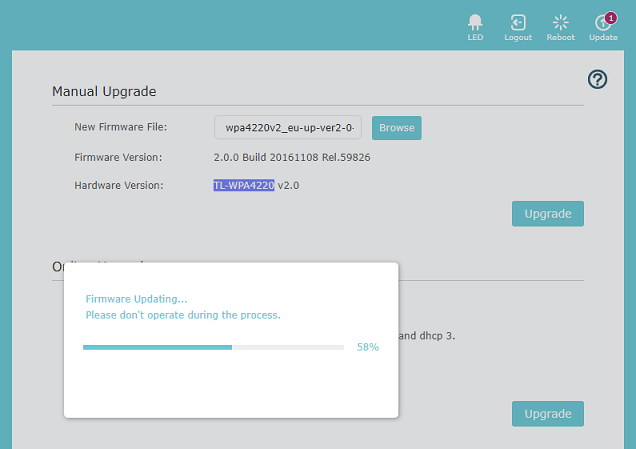
"I wonder what events, or lawsuits, lead TP-Link to add this warning presumably targeted individuals who updated firmware just ahead of performing medical procedures," writes Andrew.


"WalMart was very concerned I didn't bag my bags," wrote Rob C.


"I sure hope the pilots' map is more accurate than the one they show the passengers," wrote Maddie J.


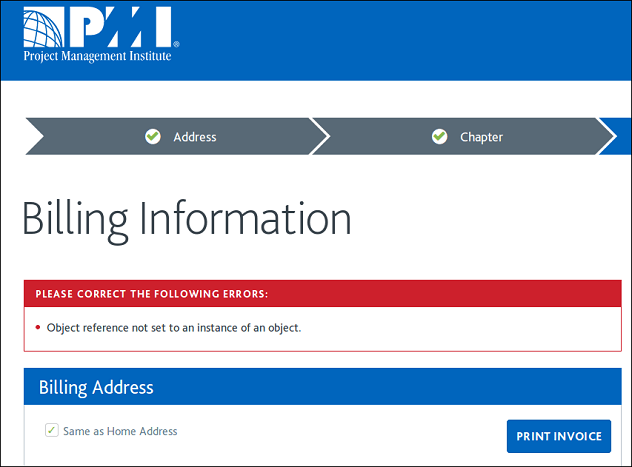
"To me, messages like this are almost like saying to the user 'See? You are the reason why this is broken. Now go and code a fix for it.'," writes Philip B.


Brian J. wrote, "To add insult to injury here, neither the 'Yes' or 'No' button worked. Especially the "No" button."


Aankhen wrote, "If nothing else, CrashPlan is very confident, I’ll give it that."


[Advertisement] BuildMaster allows you to create a self-service release management platform that allows different teams to manage their applications. Explore how!


To read the full article, please visit The Daily WTF