Monday, May 7, 2018

CodeSOD: CHashMap

There’s a phenomenon I think of as the “evolution of objects” and it impacts novice programmers. They start by having piles of variables named things like userName0, userName1, accountNum0, accountNum1, etc. This is awkward and cumbersome, and then they discover arrays. string* userNames, int[] accountNums. This is also awkward and cumbersome, and then they discover hash maps, and can do something like Map<string, string>* users. Most programmers go on to discover “wait, objects do that!”

Not so Brian’s co-worker, Dagny. Dagny wanted to write some C++, but didn’t want to learn that pesky STL or have to master templates. Dagny also considered themselves a “performance junkie”, so they didn’t want to bloat their codebase with peer-reviewed and optimized code, and instead decided to invent that wheel themselves.

Thus was born CHashMap. Now, Brian didn’t do us the favor of including any of the implementation of CHashMap, claiming he doesn’t want to “subject the readers to the nightmares that would inevitably arise from viewing this horror directly”. Important note for submitters: we want those nightmares.

Instead, Brian shares with us how the CHashMap is used, and from that we can infer a great deal about how it was implemented. First, let’s simply look at some declarations:

    CHashMap bills;
    CHashMap billcols;
    CHashMap summary;
    CHashMap billinfo;

Note that CHashMap does not take any type parameters. This is because it’s “type ignorant”, which is like being type agnostic, but with more char*. For example, if you want to get, say, the “amount_due” field, you might write code like this:

    double amount = 0;
    amount = Atof(bills.Item("amount_due"));

Yes, everything, keys and values, is simply a char*. And, as a bonus, in the interests of code clarity, we can see that Dagny didn’t do anything dangerous, like overload the [] operator. It would certainly be confusing to be able to index the hash map like it were any other collection type.

Now, since everything is stored as a char*, it’s onto you to convert it back to the right type, but since chars are just bytes if you don’t look too closely… you can store anything at that pointer. So, for example, if you wanted to get all of a user’s billing history, you might do something like this…

    CHashMap bills;
    CHashMap billcols;
    CHashMap summary;
    CHashMap billinfo;

    int nbills = dbQuery (query, bills, billcols);
    if (nbills > 0) {
        // scan the bills for amounts and/or issues
        double amount;
        double amountDue = 0;
        int unresolved = 0;

        for (int r=0; r<nbills; r++) {
            if (Strcmp(bills.Item("payment_status",r),BILL_STATUS_REMITTED) != 0) {
                billinfo.Clear();
                amount = Atof(bills.Item("amount_due",r));
                if (amount >= 0) {
                    amountDue += amount;
                    if (Strcmp(bills.Item("status",r),BILL_STATUS_WAITING) == 0) {
                        unresolved += 1;
                        billinfo.AddItem ("duedate", FormatTime("M/D/YYYY",cvtUTC(bills.Item("due_date",r))));
                        billinfo.AddItem ("biller", bills.Item("account_display_name",r));
                        billinfo.AddItem ("account", bills.Item("account_number",r));
                        billinfo.AddItem ("amount", amount);
                    }
                }
                else {
                    amountDue += 0;
                    unresolved += 1;
                    billinfo.AddItem ("duedate", FormatTime("M/D/YYYY",cvtUTC(bills.Item("due_date",r))));
                    billinfo.AddItem ("biller", bills.Item("account_display_name",r));
                    billinfo.AddItem ("account", bills.Item("account_number",r));
                    billinfo.AddItem ("amount", "???");
                }
                summary.AddItem ("", &billinfo);
            }
        }
    }

Look at that summary.AddItem ("", &billinfo) line. Yes, that is an empty key. Yes, they’re pointing it at a reference to the billinfo (which also gets Clear()ed a few lines earlier, so I have no idea what’s happening there). And yes, they’re doing this assignment in a loop, but don’t worry! CHashMap allows multiple values per key! That "" key will hold everything.

So, you have multi-value keys which can themselves point to nested CHashMaps, which means you don’t need any complicated JSON or XML classes, you can just use CHashMap as your hammer/foot-gun.

    //code which fetches account details from JSON
    CHashMap accounts;
    CHashMap details;
    CHashMap keys;

    rc = getAccounts (userToken, accounts);
    if (rc == 0) {
        for (int a=1; a<=accounts.Count(); a++) {
            cvt.jsonToKeys (accounts.Item(a), keys);
            rc = getAccountDetails (userToken, keys.Item("accountId"), details);
        }
    }
    // Details of getAccounts
    int getAccounts (const char * user, CHashMap& rows) {
      // <snip>
      AccountClass account;
      for (int a=1; a<=count; a++) {
        // Populate the account class
        // <snip>
        rows.AddItem ("", account.jsonify(t));
      }

With this kind of versatility, is it any surprise that pretty much every function in the application depends on a CHashMap somehow? If that doesn’t prove its utility, I don’t know what will. How could you do anything better? Use classes? Don’t make me laugh!

As a bonus, remember this line above? billinfo.AddItem ("duedate", FormatTime("YYYY-MM-DD hh:mm:ss",cvtUTC(bills.Item("due_date",r))))? Well, Brian has this to add:

it’s worth mentioning that our DB stores dates in the typical format: “YYYY-MM-DD hh:mm:ss”. cvtUTC is a function that converts a date-time string to a time_t value, and FormatTime converts a time_t to a date-time string.

[Advertisement] ProGet can centralize your organization's software applications and components to provide uniform access to developers and servers. Check it out!


To read the full article, please visit The Daily WTF

Friday, May 4, 2018

Error'd: Version-itis

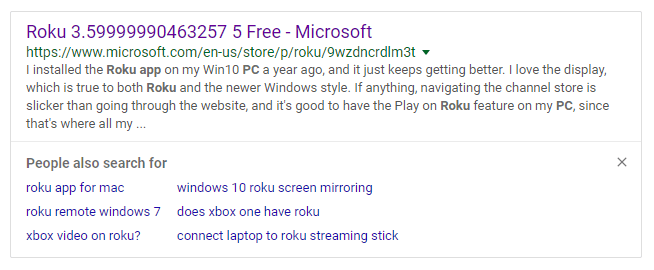
"No thanks, I'm holding out for version greater than or equal to 3.6 before upgrading," writes Geoff G.


"Looks like Twilio sent me John Doe's receipt by mistake," wrote Charles L.


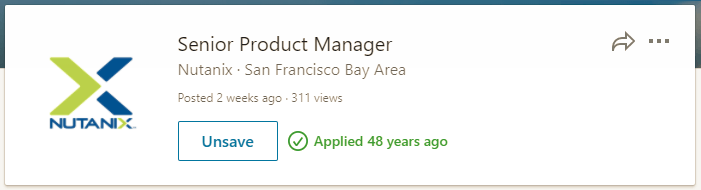
"Little do they know that I went back in time and submitted my resume via punch card!" Jim M. writes.


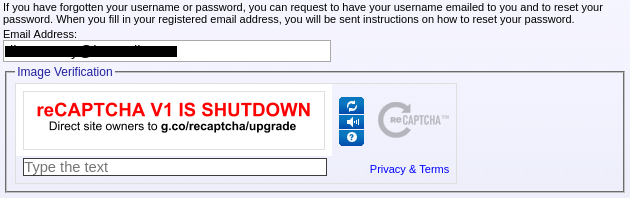
Richard S. wrote, "I went to request a password reset from an old site that is sending me birthday emails, but it looks like the reCAPTCHA is no longer available and the site maintainers have yet to notice."


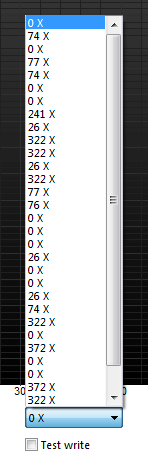
"It's nice to see that this new Ultra Speed Plus™ CD burner lives up to its name, but honestly, I'm a bit scared to try some of these," April K. writes.


"Sometimes, like Samsung's website, you have to accept that it's just ok to fail sometimes," writes Alessandro L.


[Advertisement] ProGet supports your applications, Docker containers, and third-party packages, allowing you to enforce quality standards across all components. Download and see how!


To read the full article, please visit The Daily WTF
Thursday, May 3, 2018

CodeSOD: The Same Date

Oh, dates. Oh, dates in Java. They’re a bit of a dangerous mess, at least prior to Java 8. That’s why Java 8 created its own date-time libraries, and why JodaTime was the gold standard in Java date handling for many years.

But it doesn’t really matter what date handling you do if you’re TRWTF. An Anonymous submitter passed along this method, which is meant to set the start and end date of a search range, based on a number of days:

private void setRange(int days){
        DateFormat df = new SimpleDateFormat("yyyy-MM-dd")
        Date d = new Date();
        Calendar c = Calendar.getInstance()
        c.setTime(d);

        Date start =  c.getTime();

        if(days==-1){
                c.add(Calendar.DAY_OF_MONTH, -1);
                assertThat(c.getTime()).isNotEqualTo(start)
        }
        else if(days==-7){
                c.add(Calendar.DAY_OF_MONTH, -7)
                assertThat(c.getTime()).isNotEqualTo(start)
        }
        else if (days==-30){
                c.add(Calendar.DAY_OF_MONTH, -30)
                assertThat(c.getTime()).isNotEqualTo(start)
        }
        else if (days==-365){
                c.add(Calendar.DAY_OF_MONTH, -365)
                assertThat(c.getTime()).isNotEqualTo(start)
        }

        from = df.format(start).toString()+"T07:00:00.000Z"
        to = df.format(d).toString()+"T07:00:00.000Z"
}

Right off the bat, days only has a handful of valid values- a day, a week, a month(ish) or a year(ish). I’m sure passing it as an int would never cause any confusion. The fact that they don’t quite grasp what variables are for is a nice touch. I’m also quite fond of how they declare a date format at the top, but then also want to append a hard-coded timezone to the format, which again, I’m sure will never cause any confusion or issues. The assertThat calls check that the Calendar.add method does what it’s documented to do, making those both pointless and stupid.

But that’s all small stuff. The real magic is that they never actually use the calendar after adding/subtracting dates. They obviously meant to include d = c.getTime() someplace, but forgot. Then, without actually testing the code (they have so many asserts, why would they need to test?) they checked it in. It wasn’t until QA was checking the prerelease build that anyone noticed, “Hey, filtering by dates doesn’t work,” and an investigation revealed that from and to always had the same value.

[Advertisement] Forget logs. Next time you're struggling to replicate error, crash and performance issues in your apps - Think Raygun! Installs in minutes. Learn more.


To read the full article, please visit The Daily WTF

Wednesday, May 2, 2018

CodeSOD: A Password Generator

Every programming language has a *bias* which informs their solutions. Object-oriented languages are biased towards objects, and all the things which follow on. Clojure is all about function application. Haskell is all about type algebra. Ruby is all about monkey-patching existing objects.

In any language, these things can be taken too far. Java's infamous Spring framework leaps to mind. Perl, being biased towards regular expressions, has earned its reputation as being "write only" thanks to regex abuse.

Gert sent us along some Perl code, and I was expecting to see regexes taken too far. To my shock, there weren't any regexes.

Gert's co-worker needed to generate a random 6-digit PIN for a voicemail system. It didn't need to be cryptographically secure, repeats and zeros are allowed (they exist on a keypad, after all!). The Perl-approach for doing this would normally be something like:


sub randomPIN {
  return sprintf("%06u",int(rand(1000000)));
}

Gert's co-worker had a different plan in mind, though.


sub randomPIN {
my $password;
my @num = (1..9);
my @char = ('@','#','$','%','^','&','*','(',')');
my @alph = ('a'..'z');
my @alph_up = ('A'..'Z');

my $rand_num1 = $num[int rand @num];
my $rand_num2 = $num[int rand @num];
my $rand_num3 = $num[int rand @num];
my $rand_num4 = $num[int rand @num];
my $rand_num5 = $num[int rand @num];
my $rand_num6 = $num[int rand @num];

$password = "$rand_num1"."$rand_num2"."$rand_num3"."$rand_num4"."$rand_num5"."$rand_num6";

return $password;
}

This code starts by creating a set of arrays, @num, @char, etc. The only one that matters is @num, though, since this generates a PIN to be entered on a phone keypad and touchtone signals are numeric and also there is no "(" key on a telephone keypad. Obviously, the developer copied this code from a random password function somewhere, which is its own special kind of awful.

Now, what's fascinating is that they initialize @num with the numbers 1 through 9, and then use the rand function to generate a random number from 0 through 8, so that they can select an item from the array. So they understood how the rand function worked, but couldn't make the leap to eliminate the array with something like rand(9).

For now, replacing this function is simply on Gert's todo list.

[Advertisement] BuildMaster allows you to create a self-service release management platform that allows different teams to manage their applications. Explore how!


To read the full article, please visit The Daily WTF
Tuesday, May 1, 2018

An Obvious Requirement

Requirements. That magical set of instructions that tell you specifically what you need to build and test. Users can't be bothered to write them, and even if they could, they have no idea how to tell you what they want. It doesn't help that many developers are incapable of following instructions since they rarely exist, and when they do, they usually aren't worth the coffee-stained napkin upon which they're scribbled.

A sign warning that a footpath containing stairs isn't suitable for wheelchairs

That said, we try our best to build what we think our users need. We attempt to make it fairly straightforward to use what we build. The button marked Reports most likely leads to something to do with generating/reading/whatever-ing reports. Of course, sometimes a particular feature is buried several layers deep and requires multiple levels of ribbons, menus, sub-menus, dialogs, sub-dialogs and tabs before you find the checkbox you want. Since us developers as a group are, by nature, somewhat anal retentive, we try to keep related features grouped so that you can generally guess what path to try to find something. And we often supply a Help feature to tell you how to find it when you can't.

Of course, some people simply cannot figure out how to use the software we build, no matter how sensibly it's laid out and organized, or how many hints and help features we provide. And there is nothing in the history of computer science that addresses how to change this. Nothing!

Dimitri C. had a user who wanted a screen that performed several actions. The user provided requirements in the form of a printout of a similar dialog he had used in a previous application, along with a list of changes/colors/etc. They also provided some "helpful" suggestions, along the lines of, "It should be totally different, but exactly the same as the current application." Dimitri took pains to organize the actions and information in appropriate hierarchical groups. He laid out appropriate controls in a sensible way on the screen. He provided a tooltip for each control and a Help button.

Shortly after delivery, a user called to complain that he couldn't find a particular feature. Dimitri asked "Have you tried using the Help button?" The user said that "I can't be bothered to read the instructions in the help tool because accessing this function should be obvious".

Dimitri asked him "Have you looked on the screen for a control with the relevant name?" The user complained that "There are too many controls, and this function should be obvious". Dimitri asked "Did you try to hover your mouse over the controls to read the tooltips?" The user complained that "I don't have the time to do that because it would take too long!" (yet he had the time to complain).

Frustrated, Dimitri replied "To make that more obvious, should I make these things less obvious?". The user complained that "Everything should be obvious". Dimitri asked how that could possibly be done, to which the user replied "I don't know, that's your job".

When he realized that this user had no clue how to ask for what he wanted, he asked how this feature worked in previous programs, to which the user replied "I clicked this, then this, then this, then this, then this, then restarted the program".

Dimitri responded that "That's six steps instead of the two in my program, and that would require you to reenter some of the data".

The user responded "Yes, but it's obvious".

So is the need to introduce that type of user to the business end of a clue-bat.

[Advertisement] Ensure your software is built only once and then deployed consistently across environments, by packaging your applications and components. Learn how today!


To read the full article, please visit The Daily WTF